 Graphics Processing Units (GPUs) have become a hot topic in the age of AI. Unlike Central Processing Units (CPUs), they’re built to handle many calculations in parallel, which makes them effective for workloads such as training AI models.
That naturally raises a question for people working in video technology: could GPUs also make video encoding faster or more efficient? Encoding does involve vast numbers of calculations across pixels and frames, but that doesn’t automatically make it a good fit for every kind of GPU processing.
A GPU can help an encoder in two quite different ways: its dedicated hardware can perform the encoding, or its general-purpose compute cores can accelerate parts of an encoder’s calculations. This post explains why neither approach suits our low-latency contribution encoder, and how we optimise the CPU-based alternative instead.
Two different ways to use a GPU
The phrase “GPU encoding” can refer to two quite different approaches.
- A dedicated hardware encoder: Graphics cards often include a dedicated piece of silicon that accepts video frames and produces a compressed stream. NVIDIA NVENC is an example; Intel and AMD offer equivalent technologies. This can encode video efficiently, but it is a separate encoder designed and controlled by the hardware vendor.
- General-purpose GPU computing: In this approach, parts of an existing encoder’s calculations are rewritten to run on the GPU’s many processing cores. The encoder remains the same in principle, and uses the GPU as a co-processor.
Both approaches can be useful in the right product. For our contribution encoder, however, each comes with trade-offs that matter more than raw processing throughput.
Why we don’t use a dedicated hardware encoder
While using the GPU’s dedicated hardware encoder could result in efficient video encoding, there are four reasons why we would not choose this approach for our low-latency encoders:
It is a different encoder, and we can’t change it.
Our encoder’s performance depends on decisions made inside the encoding process, so it’s important that we are able to control this. For example, one of our key requirements is to create a strict CBR or CVBR video stream that does not burst a constant bitrate transport stream. With a fixed-function hardware encoder, such decisions would be built into the vendor’s design and firmware, meaning we would not be able to control how the encoder behaves. On top of that, a problem we can fix today directly in our own code would become a vendor support ticket.
It produces lower quality per bit
Encoders must make choices, which are always a tradeoff between distortion (how much the decoded picture differs from the original, which results in lower or higher quality) and rate (the expected “cost” in terms of bits used). To make the best choice, the encoder must search a wide range of options and evaluate different “cost” models. But hardware encoders must work within the limits of their hardware and very low power limits, which means they search fewer encoding options per picture block and use simpler cost models than a software encoder. This can affect quality at a given bitrate, especially with challenging material such as noise, grain, and fast scene cuts, which is where a contribution encoder earns its keep.
Format support arrives late
When we control our encoder, we also control the support for the formats we need. When we don’t, this support can arrive late. For example, NVIDIA hardware HEVC encoding for 4:2:2 10-bit only arrived with its 2025 card generation. And when you need interlaced (1080i) coding, this also needs to be checked for each hardware generation. In one case, a GPU vendor removed interlaced support, meaning clients had to buy GPUs from eBay to have interlaced support that is critical in broadcast.
It creates dependency on the vendor
A broadcast system has a long life, often staying in service for years. Yet hardware features and behaviour can depend on a particular card model and driver version, and a driver update can change the encoder’s output. Consumer cards may also limit how many video streams they can encode simultaneously. Some data-centre cards avoid those limits, but cost considerably more. Relying on hardware encoding therefore ties the system to a vendor’s product and support roadmap.
As we mentioned above AI is heavily affecting the supply chain of components such as GPUs. Recently it has been the case that GPUs are in short supply, or prices have drastically increased (much more than CPUs). For mission-critical applications around channels and sporting events, this uncertainty is not acceptable.
Why we don’t move our encoder’s calculations to GPU compute
At first glance, video encoding sounds like an ideal workload to offload to the GPU’s many processing cores: there are many pixels, many blocks, and many frames. But when we look more closely, we realise there are problems:
Encoding is a serial chain of decisions, not a pile.
The most demanding work in our encoder is not simply a large set of independent calculations. Each block of the picture is predicted from neighbouring blocks that have already been coded, so the different calculations depend on each other. The encoder must then choose how to represent that block, trying many options and comparing their costs. This is an inherently serial task. It may be possible to split a frame into regions using tiling or slicing, but only with small numbers of slices and tiles, such as 8-16, otherwise there is a picture quality loss. That gives the server’s CPU enough parallel work to keep its cores busy, but not the thousands of independent tasks that would make a GPU a better fit.
The round-trip adds latency.
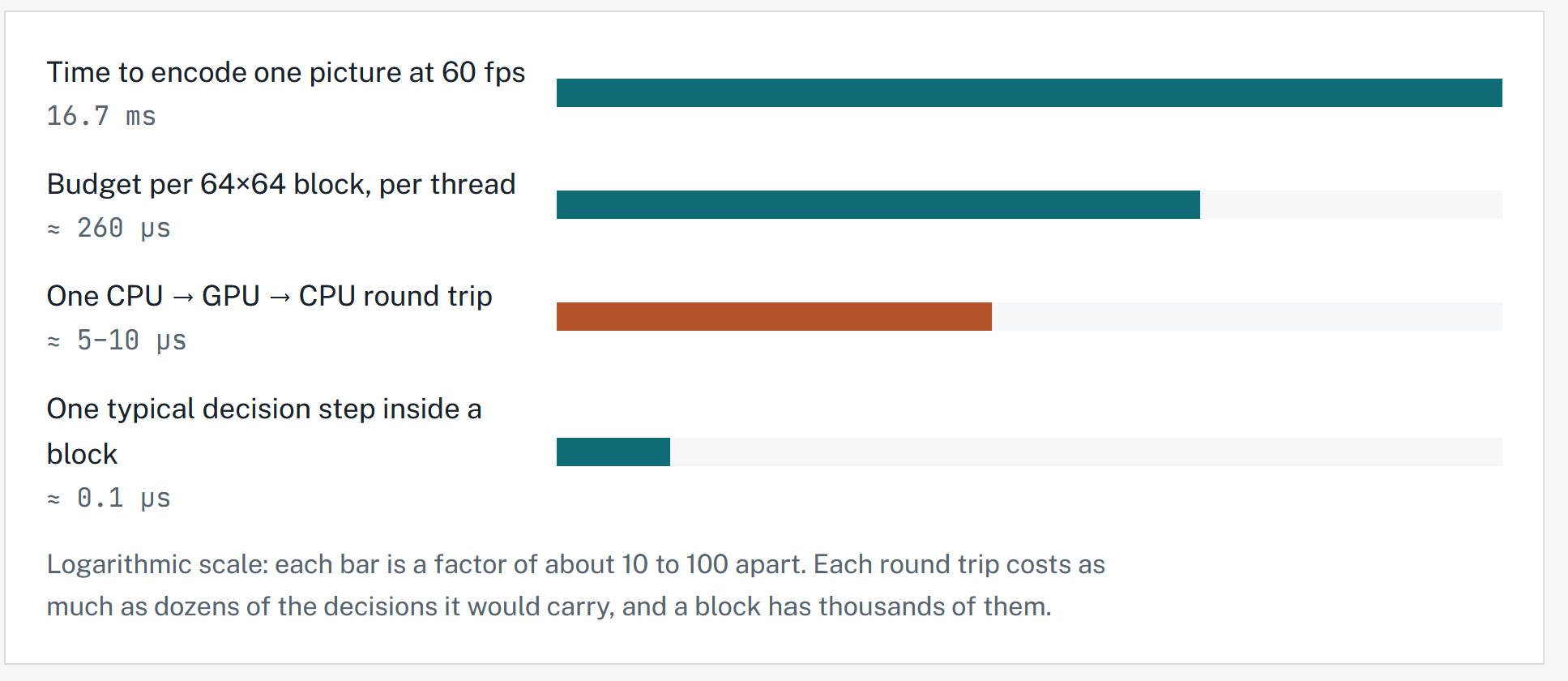
Moving work to a GPU also has a cost: the data and instructions must cross between the CPU and GPU, meaning the CPU must wait for the GPU to finish. An HEVC encoder processes the picture in blocks, including blocks up to 64 x 64 pixels, to decide how to compress it. In our timing estimate, a 64 x 64 block gets about 260 microseconds of processing time per CPU thread, during which the encoder makes thousands of small decisions. In comparison, a CPU-to-GPU-to-CPU round trip takes about 5–10 microseconds – before any of those decisions are made. Sending work back and forth for each small decision could therefore take longer than doing it on the CPU.
The parts that could move are small.
Some tasks are more suitable for GPU processing. Whole-picture analysis, such as estimating how difficult different areas will be to encode, can involve bulk calculations. The x264 project tried an OpenCL-based lookahead in 2013, which helped on weaker CPUs but offered little benefit on stronger ones – while also adding delay. That’s why, in our low-latency mode, this kind of analysis accounts for only a small share of the total work.
Most importantly, moving that analysis would not address the pictures most likely to threaten our deadline. Heavy noise and sudden scene cuts spend their time in the detailed, block-by-block decisions that remain on the CPU.
It means maintaining a second implementation.
There is also the cost of maintaining a second implementation GPU code would be a second implementation of parts of the encoder. It would need to stay in step with the CPU version, be tested as the encoder changes, and rely on a vendor-specific toolkit that might vary depending on vendor. This could roughly double the code we need to maintain and validate.
Comparing the three approaches
Here is a comparison of the three approaches to encoding – using a CPU, a GPU as a hardware encoder, or the GPU’s parallel compute capabilities:
| Property | CPU (What we do) | GPU HW encoder | GPU compute |
| Control of quality & rate decisions | Full | Vendor firmware | Full |
| Per-picture latency guarantee | Ours to enforce | Vendor’s modes | Harder (round trips) |
| Extra hardware per server | None | GPU card | GPU card |
| Codebase to maintain | One | One, plus vendor integration | Two |
| Same output on every run and version | Testable | Changes with driver | Hard to keep identical |
| Gets faster with new CPUs | Yes | New card needed | Partly |
Making the CPU path faster
Instead of adding a GPU, we focus on improving the path our encoder already uses. Specifically, we use:
- Hand-written AVX-512 vector code in inner loops. This mimics parallel processing by allowing a single instruction to perform the same operation on multiple values simultaneously.
- A threading layout designed for low latency, dividing work among CPU threads to minimise delays;
- Algorithm changes that skip unnecessary work on content that does not need it – for example, a mostly unchanged, clean area would need less searching than a noisy area or one with rapid motion.
When might we reconsider?
While our encoder currently only uses CPU, here are three cases where we might reconsider this decision:
- Webcasting use-cases: If one day we didn’t need to meet the strict CBR requirements of broadcast contribution, for example in OTT webcasting applications, the GPU may be of interest.
- A vendor opening up control of the decisions: We would also look again if hardware vendors offered more control over rate decisions and encoding modes, giving more choices to the encoding manufacturer. There is no sign of this today.
- CPU and GPU sharing memory with very fast access: If a future server platform made CPU-GPU data exchange substantially faster, we would reconsider our choice.
Until one of these conditions applies, optimising the CPU path is the more practical way to meet our latency and reliability goals.
Learn more about our low-latency contribution encoders